In an environment where almost everything happens online (processing, shopping, and communication), accessible web design is essential. It ensures that everyone can use websites. Investing in digital accessibility is not only an ethical matter but also a competitive advantage.
What is accessible web design and why is it vital in 2026?
Web accessibility involves creating web pages that can be used by anyone, regardless of their physical, sensory, or cognitive abilities. It is user-centered design.
Making a website inclusive means removing barriers that prevent people with visual, hearing, motor, or cognitive disabilities from interacting with the web. But here’s the secret: what’s necessary for a few is better for everyone.
A website that prioritizes universal usability is faster, ranks higher in search engines, and offers a seamless user experience (UX) for seniors or users with slow internet connections. To achieve this, every marketing professional and decision-maker should understand the pillars of an inclusive digital architecture.
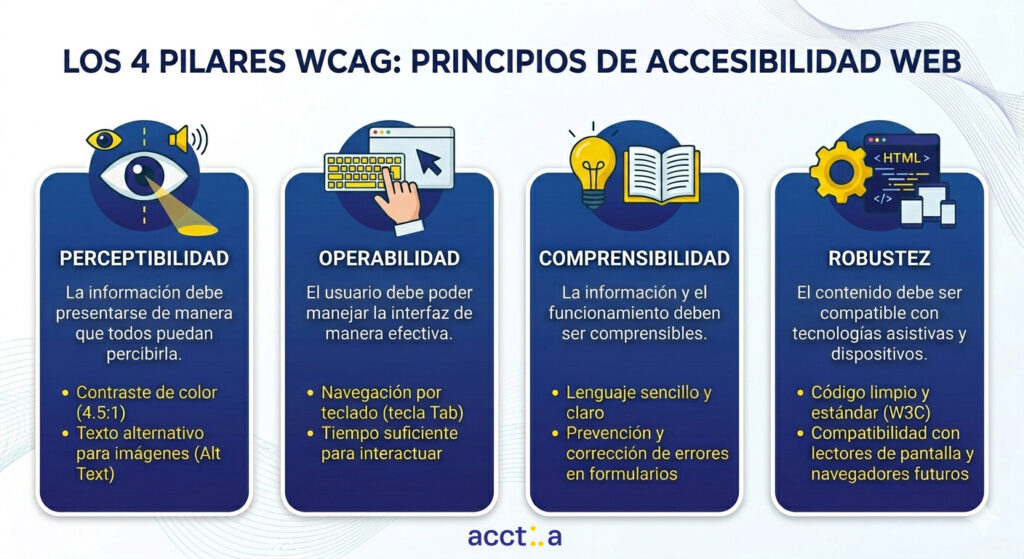
The 4 fundamental principles of accessible web design (WCAG 2.2)
For an accessible website to be truly effective, it must be based on the WCAG (Web Content Accessibility Guidelines). This is the global standard that defines how to create accessible web content.
1. Perceptibility: information that everyone can receive
We cannot rely solely on sight. Information and interface components must be presented in a way that users can perceive them.
- Contrast and color: An accessible website requires a contrast ratio of at least 4.5:1. Companies like Apple have natively integrated this into their design systems, demonstrating that aesthetics and accessibility are not mutually exclusive.
- Alternative text (Alt Text): Crucial for SEO and screen readers. An image without a description is a complete information vacuum for a blind person. Large companies like Microsoft integrate detailed descriptions into their interfaces to ensure no one misses the message.
2. Operability: navigation without physical barriers
The user should be able to operate the interface effectively, regardless of the hardware they use.
- Mouse independence: Many users rely on the keyboard or switches. If your dropdown menu only works by hovering the mouse over it, it’s an insurmountable barrier. Keep in mind that other people navigate using their voice, indicating the section they want to access.
- Sufficient time: Public administrations often use sessions with limited time. An inclusive design allows adjusting or extending those limits for people who process information more slowly.
3. Comprehensibility: Clarity as a conversion driver
The information should be legible and the interface should function predictably.
- Simple language: Avoiding unnecessary technical terms helps people with cognitive disabilities and foreign or older users.
- Error prevention: Forms should clearly warn of errors, not only with a red color (which a colorblind person might not distinguish), but with explanatory text.
4. Robustness: future-proof
Your website must be interpretable by a wide variety of user agents, including assistive technologies. Clean code that adheres to W3C standards ensures that your website will remain navigable as technology advances.
The challenge of redesign: is it necessary to start from scratch?
Imagine a marketing manager at a company with over 50 employees. She knows her website doesn’t comply with the European Accessibility Directive, but the budget for a complete redesign is prohibitive this quarter, and the developers are overwhelmed. This is the reality for many professionals who want to be inclusive but fear the technical costs.
This is where technology becomes the bridge. Instead of facing a traumatic months-long programming process, solutions like Acctua allow for a seamless adaptation. It’s like installing a smart assistant that instantly lets any user customize their interface: increasing font sizes, stopping animations that cause dizziness, or activating voice commands.
This layer of intelligence makes inclusion a reality today, allowing people with different abilities to browse, shop, or conduct business without the company having to rebuild its digital foundations.
Does your website meet accessibility requirements by 2026? Request a free audit now with our team and discover what barriers are affecting your users and how to fix them.
Accessible web design is not just about complying with regulations, but about deciding what kind of experience you want to offer.
You can have a website that works… or a website that works for everyone.
And in an environment where competition is just a click away, that difference changes everything.
The impact of accessible web design on SEO and User Experience (UX)
There is a perfect symbiosis between inclusive design and organic search engine optimization. Google prioritizes websites that offer an excellent user experience.
- Lower bounce rate: If an older person finds a website easy to read and navigate, they will stay longer.
- Better information architecture: The hierarchical heading structure (H1, H2, H3) required for screen readers is the same one used by Google’s algorithms to understand your content.
- Faster loading: Accessible websites typically avoid heavy and unnecessary scripts, which improves Core Web Vitals.
Success stories: when web accessibility translates into benefits
If there are still those who think that accessible web design is an expense and not an investment, the following examples demonstrate that digital inclusion is a business accelerator:
1. Legal & General: 100% Return on Investment
British insurer Legal & General undertook a complete redesign of its website focused exclusively on accessibility. The audited and publicly available results were astounding:
- Results: In just 12 months, their organic traffic (SEO) increased by 25%.
- Direct benefit: They achieved a 100% ROI in the first year. In addition, site maintenance costs plummeted because the code was much cleaner and more efficient. (Source: W3C Web Accessibility Initiative Cases).
2. Campofrío and Acctua: A step forward in digital inclusion
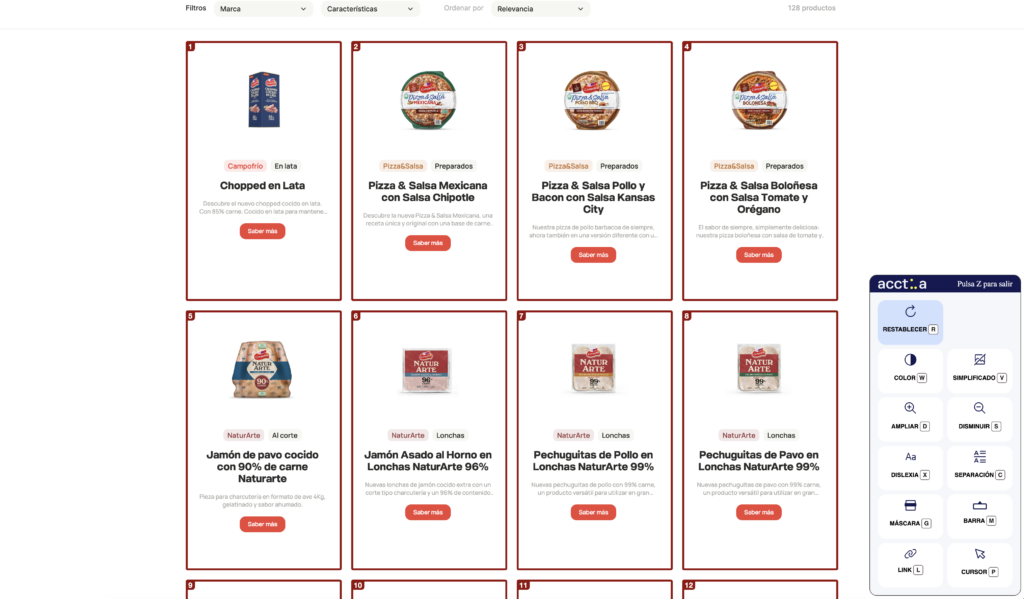
Campofrío was a pioneer in Spain in integrating NaviLens technology into its products (smart QR codes for people with visual impairments). It has also integrated the Acctua tool into its website to ensure that anyone, regardless of ability, can interact and make purchases.
- The benefit: Thanks to this technology, the user can adapt the Campofrío website to their specific needs in real time (font adjustment, voice commands, reading modes for ADHD, etc.).
- The lesson: Campofrío not only meets accessible web design standards, but also reinforces its brand image as an organization that cares for all its consumers equally. It demonstrates that a large corporation can be accessible without paralyzing its IT department for months. The perfect example of 360º Inclusion.
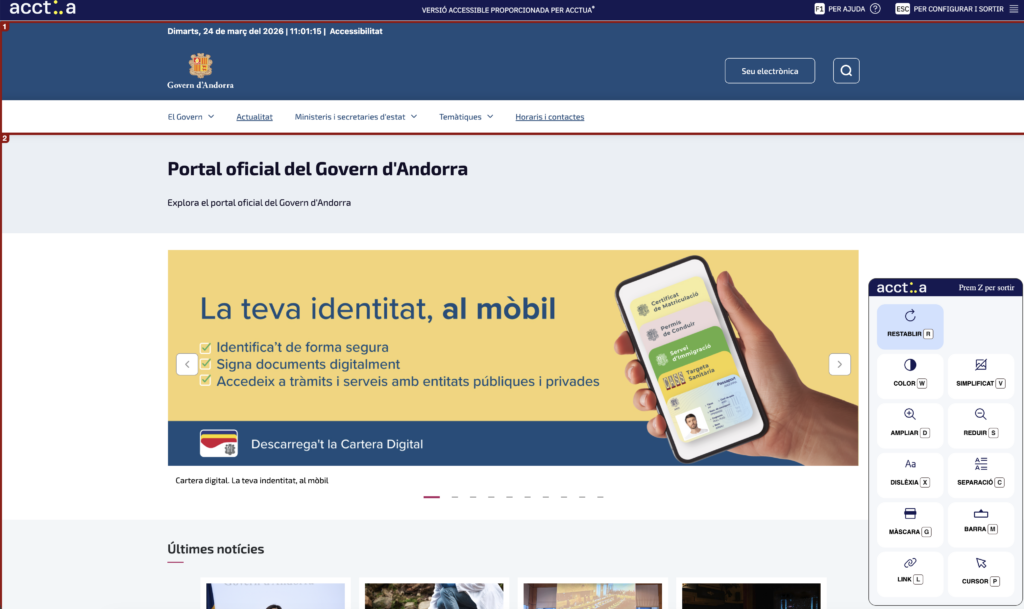
3. Government of Andorra: accessibility for an entire country
The Government of Andorra is an international leader in the digitalization of public services. By integrating Acctua into its digital ecosystem, it has ensured that any citizen, regardless of their physical or sensory abilities, can carry out their administrative procedures independently.
- The benefit: An accessible government portal drastically reduces the digital divide and the need for in-person assistance. For a public administration, this translates into more efficient management and exemplary compliance with citizens’ rights in the digital environment.
FAQ
Frequently asked questions about accessible web design
1. Is web accessibility mandatory in Spain?
Yes, especially after the entry into force of Real Decreto 1112/2018 for the public sector and the European Accessibility Directive 2019/882, which affects companies in essential services, banking and e-commerce with more than 10 employees or turnovers exceeding 2 million euros.
2. 2. How does accessible web design benefit my marketing strategy?
Expand your potential market. In Spain, the “silver economy” sector (over 65s) has high purchasing power and requires clear interfaces. If your website turns them away, you’re losing out on direct sales.
3. What happens if my website is not currently accessible?
Besides the risk of administrative penalties, you’re missing out on a huge potential market. According to the OMS, 16% of the world’s population has a significant disability. Ignoring accessibility is like closing the door on one in six potential customers.
4. Can I make an old website accessible without changing the base code?
Yes, through support tools like Acctua, which function as a customization layer for the end user, adapting the display and interaction without altering the company’s original design.
5. Does digital accessibility help my brand image (CSR)?
Absolutely. Being an inclusive company is a differentiating factor. Today, consumers (especially Generation Z and Millennials) prefer brands with demonstrable ethical values.